The central
nervous system
of your business

Every job, one thread.

Estimate, approval, schedule, pick list, invoice, paid — one record from "how much?" to money in the bank. You already run your business from your phone. JobNerve just makes the phone good at it.

14 days free, cancel any time before it ends · one flat price for your whole crew

Get it on Google Play
8:57 PM Dan Kowalski how much to redo the back fence? wrote it up on the drive home — take a look 👇 Kowalski — back fence 80 ft cedar privacy · gate $3,950 Review & approve wife says go 👍 approved it ✓ Approved — signed Dan Kowalski Job ready to schedule · pick list ready Invoice built · nothing retyped That's it. That's the software.
Fig. 1 — one job, "how much?" to paid
Estimate → Approved → Scheduled without re-typing anything
Works on any phone installs like an app
Your brand on everything customers see

Built by fence people who are tired of not having software for them.

Pick your trade when you sign up and JobNerve starts out speaking your language: your job types, your checklist, your everyday line items.

SEC. 01

Everything between the handshake and the final payment

JobNerve keeps a job moving from first estimate to paid invoice — and everyone on the crew knows what's next.

F-01

Estimates that close

Send a link. Your customer checks the options they want, sees the total update live, and approves on their phone. Attach photos, docs, even a site sketch — they ride along with the estimate.

F-02

Scheduling built for crews

Approved jobs wait in a tray at the top of the calendar. Tap one, then tap a day (or drag it on a computer). Multi-day jobs respect weekends, and every job links to directions and the customer's number.

F-03

Invoices without the spreadsheet

Turn an approved estimate into an invoice in one click. Payments log against it; open, partial, paid is figured from the numbers, never typed.

F-04

Inventory & pick lists

Approval builds the pick list from the estimate. The crew checks materials off as they load, and stock updates when the truck is packed, and you get a heads-up when something runs low.

F-05

The right access for every hand

Admins see everything; crew see what you decide — per area, enforced on the server, not just hidden buttons.

F-06

It looks like your company

Your logo and colors on the login screen, the app, and every estimate your customers see. JobNerve runs it — your name is on it.

F-07

Your own email, built in

Send estimates and invoices from your own address, attachments and all. No copy-paste into a separate app, no wondering if it went through. Using Outlook, Yahoo or a Gmail app password? You can read your inbox right inside JobNerve too.

F-08

A dashboard you build yourself

Drag the numbers that matter to the top — money collected, win rate, jobs to schedule, low stock. Press and hold to move or hide them, like the home screen on your phone.

F-09

Get paid online

Customers pay the invoice by card or bank, straight to your account. Card payments cost you 3.5% + 30¢, taken out of that payment before it reaches you. Bank payments cost you nothing: your customer pays 1%, never more than $15. Cash and checks still welcome.

Rolling out this season
QuickBooks syncYour customers, invoices, and payments flow to QuickBooks on their own. Your bookkeeper never knows the difference.
SEC. 02

See it think

Real screens from the real app — this is what your crew opens every morning.

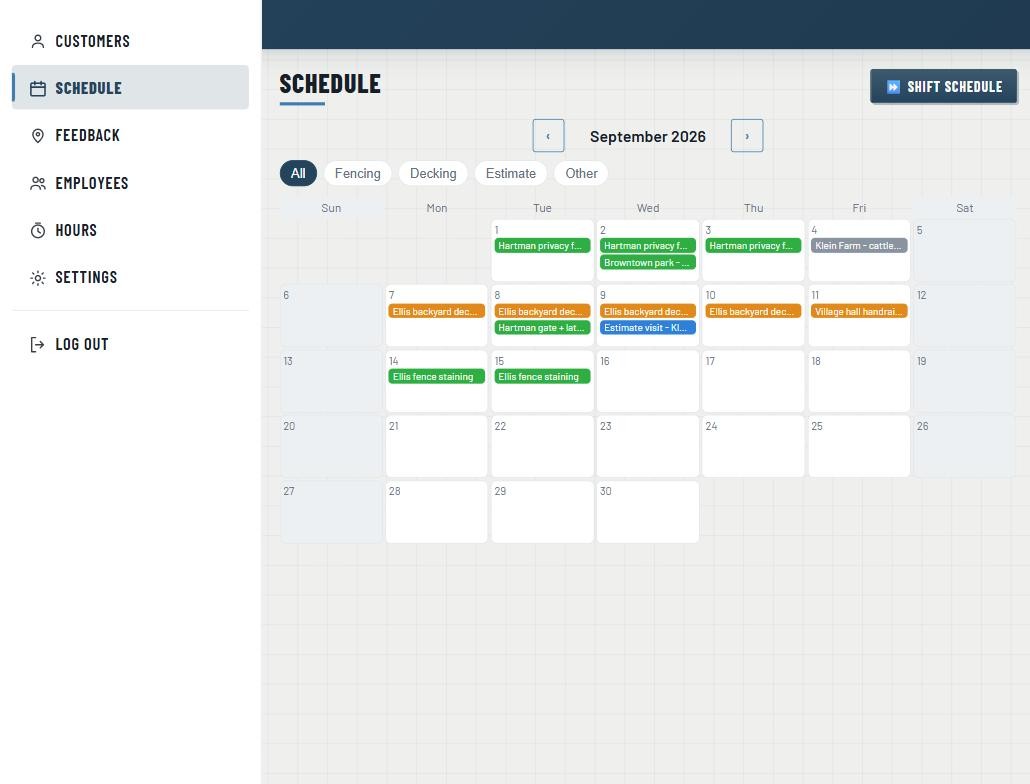
Approved jobs land in the tray with the pick list already built. Put one on a day and the crew's morning is set.

JobNerve schedule with unscheduled jobs tray
Sheet 1/3Schedule — unscheduled tray

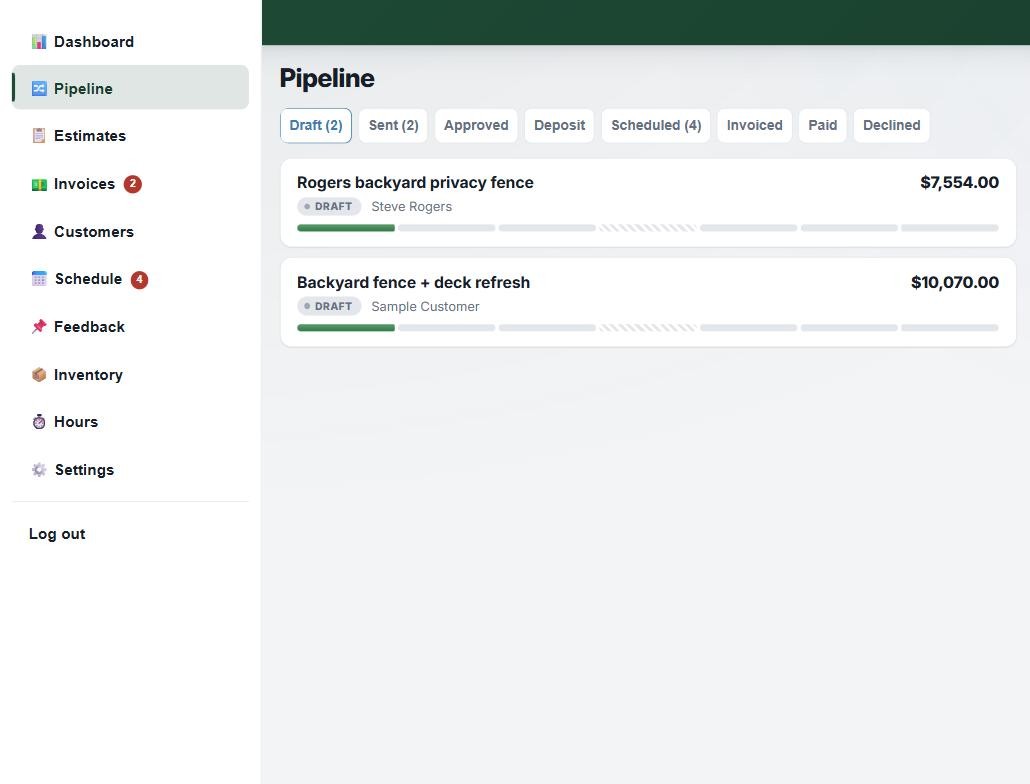
Draft, sent, approved, deposit, scheduled, invoiced, paid — one Job Board, no whiteboard, nothing slipping between stages.

JobNerve Job Board with job stages
Sheet 2/3Job Board — job stages

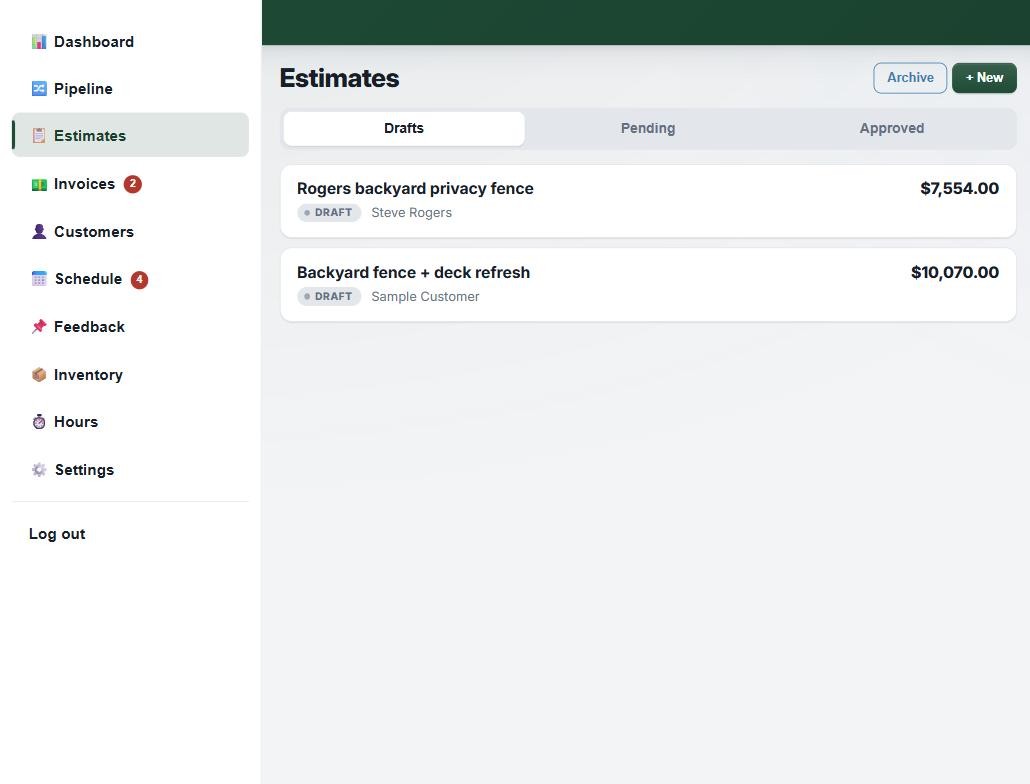
Send an estimate and watch it move — first viewed, options picked, approved — instead of wondering all week.

JobNerve estimates list
Sheet 3/3Estimates — open tracking
SEC. 03

How a job flows

One record, start to finish. Nothing re-entered, nothing lost in a text thread.

01

Write the estimate

Sectioned line items, optional add-ons, linked to your inventory.

02

Customer approves

Online from the link you send — or log a phone or paper approval.

03

Schedule the crew

The job lands in the tray; drag it onto the calendar. Pick list is ready.

04

Invoice & get paid

One click from estimate to invoice — send it from your own email, payments tracked to the penny.

SEC. 04

One flat price for your whole crew.

Pick the plan that fits how you work and pay one monthly price. No per-person fees: every hand gets their own login, so nobody shares a PIN.

Calendar

Just the scheduling — start here
$14.99/mo
Any crew size5 GB photos
  • Drag-and-drop crew calendar
  • Unscheduled-jobs tray
  • Day view with directions & one-tap calling
  • Your customer list
  • Upgrade anytime — your data comes with you
Get the Calendar

Crew

For the big operations
$119/mo
Whole crew, no seat fees100 GB photos
  • Everything in Complete, plus
  • Job costing: profit on every job
  • Room for the whole operation
  • 4× the photo & file storage
Get Crew

No plan charges per person. Hire all summer and your price doesn’t move. Running a big operation? Talk to us.

Online payments are optional. Card: 3.5% + 30¢ per payment, taken from your payout. Bank: free to you, your customer pays 1% (max $15).

You asked. We built it.See the credits →

Stop running your business out of a text thread

Built in Wisconsin by fence and concrete guys, and shaped by the crews who use it. Questions first? Email jobnerve@gmail.com. A real person answers: the people who build it.

Try it free for 14 days